
There's a specific kind of tedium in inventory management that nobody talks about enough: reading hardware labels. You pull a disk from a shelf, squint at the tiny print, manually type the serial into a spreadsheet, look it up in the inventory system, figure out if it's already tracked, and add it if it isn't. Repeat that thirty times in a single shift and you start fantasizing about a career in farming. I got tired of it and built something to fix it.
WHAT THE APP ACTUALLY DOES
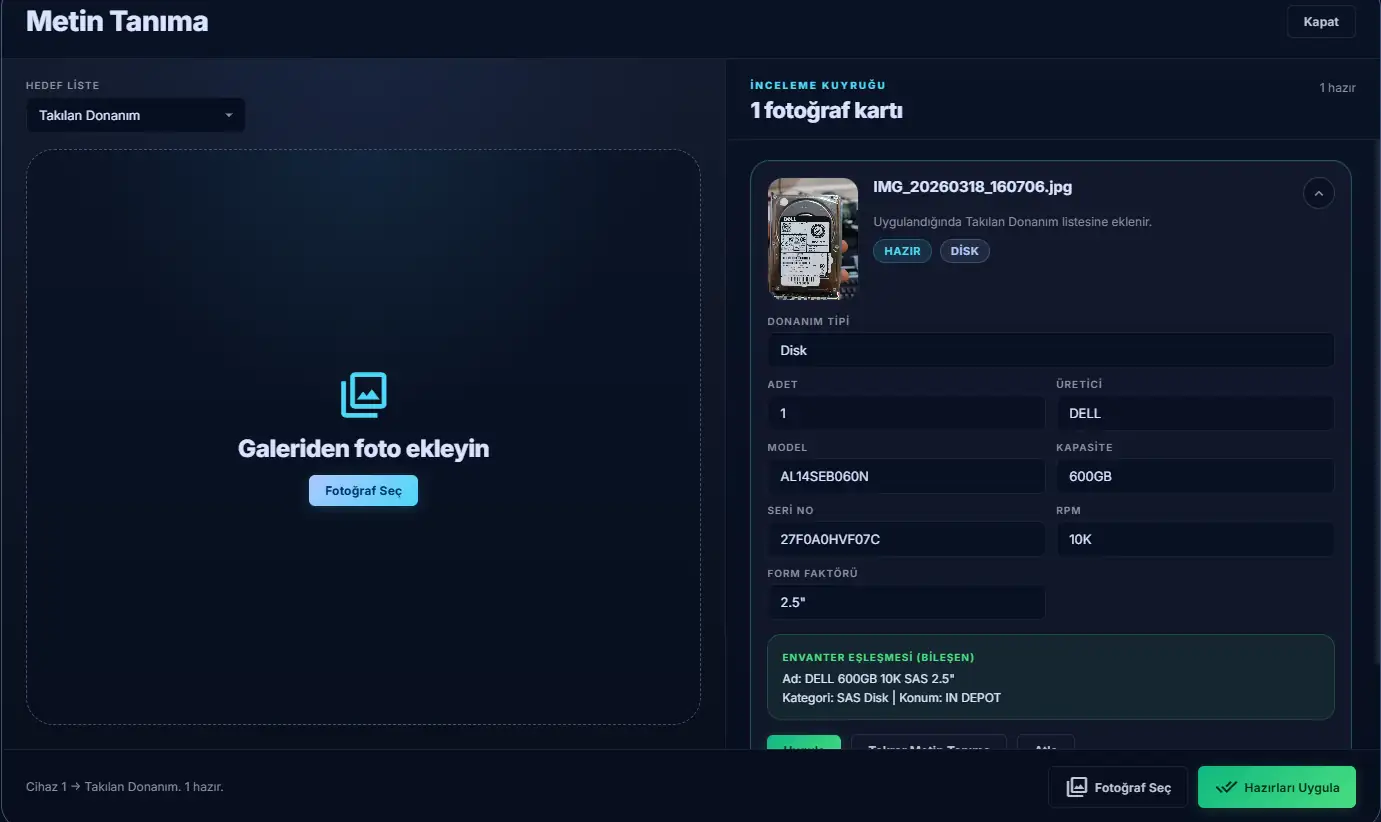
I made an internal web app that reads hardware labels using a phone camera and runs lookups against an inventory database. You open the app on your phone, point it at a label, and tap capture. The app sends the image to a vision model with a structured prompt that tells it exactly which fields to extract for each hardware type. You get back a pre-filled form, confirm or adjust the fields, and the component is ready to log.
WHAT IT READS
The OCR layer handles four hardware categories: disks, RAM modules, NICs, and CPUs. Each has its own field set because a disk label and a RAM label have almost nothing in common. For a disk, the app looks for manufacturer, model, capacity, serial, RPM, and form factor. For RAM, it extracts capacity, DDR generation, speed rating, rank configuration, and part number. NICs get manufacturer, model, speed, port count, and bus interface. CPUs get model, frequency, core count, socket type, and part number.
THE INVENTORY LOOKUP
Reading the label is only half the job. Once the app has the extracted fields, it tries to match what it found against the inventory database automatically.
For items with a serial number, the match is direct: it queries the asset and component tables for that exact serial. If it finds something, the result comes back with the full inventory record attached: asset tag, category, location, and current status. You immediately know whether the component you're holding is already tracked and where it's supposed to be.
For items that don't have a serial match, either no serial was readable or the component isn't in the system yet. The app uses the extracted attributes to derive a standardized name. It scores existing inventory entries by how closely their names align with the extracted fields (manufacturer, capacity, RPM, form factor) and uses the best match as the suggested name for the new entry. The result is that newly logged components are named consistently with whatever naming convention the database already uses, rather than in whatever format happened to appear on the label.
WHY IT RUNS ON YOUR PHONE
The whole OCR flow is designed around mobile use because that's where the work actually happens. You're not sitting at a desk when you're reading labels. You're standing in front of a rack with both hands occupied. The camera overlay has a framing guide to help position the label, a live preview, and a capture button large enough to hit without looking directly at the screen. There's also a queue system so you can photograph a batch of components before reviewing and applying the results all at once, which is considerably faster than processing them one by one.
Gallery mode covers situations where you already have the photos. If someone handed you a box of components and you photographed everything on the way out, you can upload the images after the fact and let the app process them in bulk.
CONCLUSION
What this actually solves is the manual transcription problem. Whether you're doing an incoming hardware check or tracking down where a component ended up, the bottleneck used to be the gap between "label in front of you" and "information in the system." That gap is now measured in seconds rather than minutes, which is exactly what I wanted out of it.