
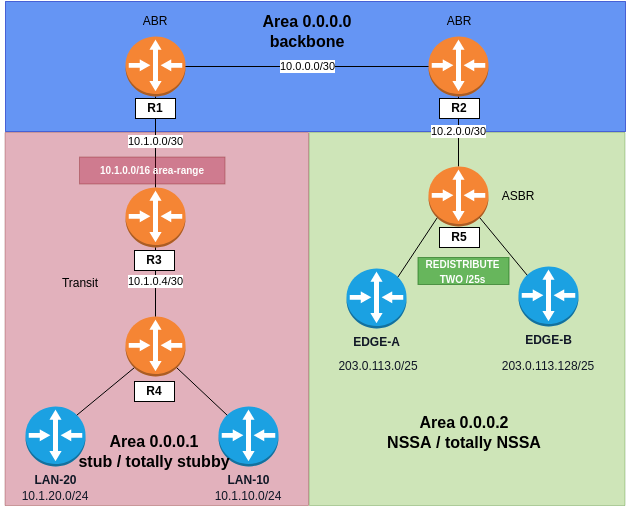
This is the seventh lab in my JNCIP-ENT series. It continues from the multi-area OSPF lab. We will use the same topology. Area 1 will become a stub and then a totally stubby area. Area 2 will become an NSSA and then a totally NSSA.
Overview
The domain is the same one from Lab 6:
- R1 is the ABR between Area 0 and Area 1.
- R2 is the ABR between Area 0 and Area 2.
- R3 and R4 are internal to Area 1.
- R5 is the ASBR in Area 2.
Why Area 1 Is the Stub and Area 2 Is the NSSA
Before we change any config, it is good to explain why Area 1 is the stub and Area 2 is the NSSA, because this is a very common question. A stub area cannot contain an ASBR. The reason for a stub area is that it carries no Type 5 external LSAs, and an ASBR exists to create them. Area 2 has R5, and R5 redistributes real edge subnets, so Area 2 must be the NSSA. NSSA means Not-So-Stubby Area. It is a special area type that is almost a stub but can still create its own external routes. This leaves Area 1, which has no ASBR, so Area 1 can be the normal stub.
Topology
Starting State
After Lab 6:
- All five adjacencies are Full.
- R1 has
area 0.0.0.1 area-range 10.1.0.0/16. - R5 redistributes its two edge subnets. For this lab, R5 advertises the two separate
/25networks,203.0.113.0/25and203.0.113.128/25, as two Type 5 LSAs, not the single aggregate from the end of Lab 6. So we have two external routes to watch. They will disappear and then come back.
Step 1: Read the Area 1 Database First
We will compare everything in the first part against the database before the stub change. On R3 (or R4):
show ospf databaseArea 0.0.0.1 should have these LSAs now:
- Router (Type 1) - three, one for R1, one for R3, and one for R4. Area scope.
- Network (Type 2) - two, one for each broadcast transit segment (R1-R3 and R3-R4). The DR on each segment advertises it.
- Summary (Type 3), from R1 - the inter-area prefixes that R1 sends into Area 1 from the other areas: the backbone (
10.0.0.0/30,10.0.255.1/32,10.0.255.2/32) and Area 2 (10.2.0.0/30,10.2.255.5/32). - ASBRSum (Type 4), from R1 - link-state ID
5.5.5.5. R2 creates the Type 4 in the backbone, and R1 creates it again into Area 1, so the routers in Area 1 know how to reach the ASBR, which is two areas away. - Extern (Type 5), from R5 - the two edge subnets
203.0.113.0/25and203.0.113.128/25. They have domain scope, so they enter Area 1 without change.
Step 2: Make Area 1 a Stub
The stub flag goes on every router in the area. The E-bit in the hello packet must match on both sides of every adjacency, or the neighbor goes down.
R1 (the ABR):
set protocols ospf area 0.0.0.1 stub default-metric 10R3:
set protocols ospf area 0.0.0.1 stubR4:
set protocols ospf area 0.0.0.1 stubCommit on all three:
show ospf databaseWhat changed: the Type 4 and both Type 5 LSAs are gone. In their place there is one Summary 0.0.0.0 from R1. This is the default route, and it is a Type 3 LSA with metric 10. The inter-area Type 3 LSAs are still here.
The default route is not automatic. The stub flag alone only makes R1 stop sending Type 4 and Type 5 into the area. Without default-metric on the ABR, there is no 0.0.0.0 at all, and the area has no path to the external routes that it just lost. Metric option lets you choose which ABR the area uses to exit, and at which cost.
Step 3: Make It Totally Stubby
Totally stubby means a stub that doesn't have the inter-area Type 3 LSAs. Then the area sees only its own topology and one default route. We only add no-summaries at the end on the ABR only. R3 and R4 do not change, because the ABR is the router that creates the Type 3 LSAs.
R1:
set protocols ospf area 0.0.0.1 stub no-summariesThe stanza on R1 now looks like this:
stub { default-metric 10; no-summaries;}Let's look at R3 again:
show ospf databaseNow the inter-area Type 3 LSAs are also gone. R3 and R4 have only their own router and network LSAs, plus the single default Type 3. This is the main idea of totally stubby: the database becomes only the local topology and one way out.
The normal question is: can the area still reach anything? R3 has no specific route for most of the domain now. We test it with a real external target on R5:
show route 0.0.0.0/0ping 203.0.113.1 source 10.1.255.3 count 2The default route points to R1, and the ping to R5's edge works, even if R3 has no specific route for 203.0.113.0/25. All non-local traffic just follows 0.0.0.0/0 out of the area.
Step 4: Make Area 2 an NSSA
Now the other side. R2 is the ABR, and R5 is the internal ASBR. This is where the Type 7 LSA lives. We do not change R5's redistribution policy. We only change the area type, and this changes which LSA the same redistribution creates. Set the NSSA flag on both routers in the area. The N/P-bit must match, the same idea as the stub E-bit:
R2:
set protocols ospf area 0.0.0.2 nssaR5:
set protocols ospf area 0.0.0.2 nssaCommit and R5's redistributed edge subnets are not Type 5 anymore. They are Type 7:
show ospf database nssaOn R5 you should see two NSSA (Type 7) entries, 203.0.113.0/25 and 203.0.113.128/25, advertised by R5. Type 7 has area scope. Unlike a Type 5, it does not flood out of Area 2 by itself.
Then how does the rest of the domain still reach these prefixes? R2 translates them at the boundary. Look at the external LSAs on R1:
show ospf database externalThe same two edge prefixes are now Type 5 LSAs, but advertised by R2 (2.2.2.2), not by R5. Let's look at one with extensive to see how it works:
show ospf database external extensiveThe translated Type 5 has a forwarding address that is not zero, and it points to R5. So the Type 7 became a Type 5 at the ABR. R2 owns it in the backbone, but the traffic still goes to the real ASBR. This forwarding address is also the reason the translation happens at all: a Type 7 with a forwarding address of 0.0.0.0 is not translated. This is why R5's loopback (10.2.255.5) is advertised into the NSSA. It gives a real forwarding address that is not zero.
One thing you will not see: none of this reaches R3 or R4. Area 1 is totally stubby from the first part, so the translated Type 5 lives only in the backbone and in Area 0.
Step 5: Add a Default Route to the NSSA
An NSSA also does not get a default route automatically, the same as the stub. We add one from the ABR:
R2:
set protocols ospf area 0.0.0.2 nssa default-lsa default-metric 10Read R5 again:
show ospf database nssaThe default route is now a Type 7 (0.0.0.0), advertised by R2. Remember this: a normal NSSA default route is a Type 7. This will change in the next step.
Step 6: Make It Totally NSSA
Add no-summaries on the ABR, the same as totally stubby:
R2:
set protocols ospf area 0.0.0.2 nssa no-summariesThe stanza on R2 now looks like this:
nssa { default-lsa { default-metric 10; } no-summaries;}Two things change on R5:
show ospf databaseFirst, the inter-area Type 3 LSAs are removed. This is no-summaries, the same as in the stub. Second the default route changes from a Type 7 to a Type 3 (Summary 0.0.0.0 from R2). By default, Junos advertises the default route of a totally NSSA as a Type 3, not a Type 7.
What does not disappear is R5's own Type 7 external LSAs. They stay, because the area can still create externals. This is the whole reason to choose NSSA instead of a normal stub.
Two options to know:
- If you need the default route as a Type 7 again, for compatibility or to carry a Type-1 metric, you force it with
set protocols ospf area 0.0.0.2 nssa default-lsa type-7. - In Lab 6 we used
area-rangeon the ABR to summarize the Type 3 LSAs of a normal area. An NSSA ABR usesnssa area-rangeto summarize the Type 7-to-Type 5 translation. On R2, this would advertise203.0.113.0/24as one translated Type 5 instead of two.
Area Type Reference
These are the LSA types that each area allows:
| Area type | T1/T2 | T3 (inter-area) | T4/T5 (external) | T7 | Default |
|---|---|---|---|---|---|
| Regular | yes | yes | yes | no | not needed |
| Stub | yes | yes | no | no | optional T3, manual |
| Totally stubby | yes | no | no | no | T3, required for reachability |
| NSSA | yes | yes | no (T5), local T7 only | yes | optional T7, manual |
| Totally NSSA | yes | no | no (T5), local T7 only | yes | T3 (or forced T7) |