
I have started preparing for JNCIP-ENT and this is actually my second lab for it. I first tried to build a PVLAN lab, but after wasting many hours of troubleshooting I found that it does not actually work on vQFX. In this post, I walk through a full MVRP setup, a protocol that I had not heard before.
What's MVRP and Why It Matters
MVRP (Multiple VLAN Registration Protocol) is a Layer 2 protocol that advertises VLAN membership across trunk links. It's like Cisco's VTP. Its goal is to reduce manual VLAN configuration between switches.
At a high level:
- A switch sends MVRP PDUs when VLAN state changes.
- Neighbor switches process those PDUs and update VLAN registration state.
- Timers control how quickly updates are transmitted and withdrawn.
Why MVRP Does Not Actually Matter
In production networks, MVRP is often not used.
The reason is simple: control.
- Dynamic VLAN propagation can spread changes farther than intended.
- It is harder to audit because VLAN state can change through protocol behavior, not only config changes.
- Troubleshooting becomes more complex because you must validate timers, advertisements, and state machines, not just interface config.
It is better to use explicit trunk allow-lists and automation pipelines. If a VLAN is present, we want it to be because it was intentionally configured, not magically appearing out of nowhere.
MVRP Message States
MVRP message/state names:
New: A new VLAN attribute appeared.JoinIn: VLAN is declared and registered.JoinEmpty: VLAN is declared but not yet registered.In: VLAN is registered but not declared.Empty: VLAN is neither declared nor registered.Leave: A previously registered VLAN is being withdrawn.LeaveAll: Participants should re-advertise active registrations.
I hope they do not ask about these in the exam because there is no way I am remembering all of that.
MVRP Timers
MVRP uses timers to control the rhythm of VLAN advertisement, aging, and refresh across the network.
Join timer: Controls how quickly join updates are sent.Leave timer: Controls how long a learned VLAN stays before it is removed.LeaveAll timer: Controls periodic full refresh behavior.
Typical defaults are around join 200 ms, leave 1000 ms, and leave-all 10000 ms.
Lab Topology
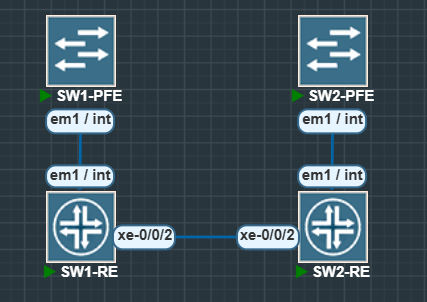
SW1: VLAN source sideSW2: Learning side- Trunk link:
xe-0/0/2between SW1 and SW2 - Test VLANs:
v10,v20,v30
In this lab SW1 will advertise VLAN activity and SW2 will dynamically learn it.
Step 1: Build VLAN and Access/Trunk State on SW1
Create VLANs:
# SW1configureset vlans v10 vlan-id 10set vlans v20 vlan-id 20set vlans v30 vlan-id 30Configure access ports:
set interfaces xe-0/0/0 unit 0 family ethernet-switching interface-mode accessset interfaces xe-0/0/0 unit 0 family ethernet-switching vlan members v10set interfaces xe-0/0/1 unit 0 family ethernet-switching interface-mode accessset interfaces xe-0/0/1 unit 0 family ethernet-switching vlan members v20Configure trunk toward SW2:
set interfaces xe-0/0/2 unit 0 family ethernet-switching interface-mode trunkset interfaces xe-0/0/2 unit 0 family ethernet-switching vlan members v10set interfaces xe-0/0/2 unit 0 family ethernet-switching vlan members v20set interfaces xe-0/0/2 unit 0 family ethernet-switching vlan members v30Enable RSTP on participating interfaces:
set protocols rstp interface xe-0/0/0set protocols rstp interface xe-0/0/1set protocols rstp interface xe-0/0/2commit and-quitRSTP is not strictly required for MVRP, but it helps keep Layer 2 stable.
Step 2: Prepare SW2 as the Learning Side
# SW2configureset interfaces xe-0/0/2 unit 0 family ethernet-switching interface-mode trunkset protocols rstp interface xe-0/0/2commit and-quitStep 3: Enable MVRP on Both Sides
# SW2configureset protocols mvrp interface xe-0/0/2commit and-quit# SW1configureset protocols mvrp interface xe-0/0/2commit and-quitAt this point, SW1 can advertise its VLANs and SW2 can register what it learns.
Step 4: Verify MVRP Operation
On SW2:
show mvrpshow mvrp dynamic-vlan-membershipsshow mvrp statisticsSW1 show mvrp:
SW2 show mvrp:
SW2 show mvrp dynamic-vlan-memberships:
SW2 show mvrp statistics:
What to look for:
- MVRP enabled on the expected interface
- Dynamic VLAN memberships present (for active VLANs)
- RX/TX counters moving without obvious errors
Step 5: Demonstrate Dynamic Registration and Pruning with VLAN 30
Create temporary VLAN 30 activity on SW1:
# SW1configureset interfaces xe-0/0/4 unit 0 family ethernet-switching interface-mode accessset interfaces xe-0/0/4 unit 0 family ethernet-switching vlan members v30commit and-quitVerify learning on SW2:
show mvrp dynamic-vlan-membershipsRemove VLAN 30 activity on SW1:
# SW1configuredelete interfaces xe-0/0/4 unit 0commit and-quitCheck SW2 again after timer expiry:
show mvrp dynamic-vlan-membershipsExpected result: VLAN 30 disappears from dynamic memberships after withdrawal.
Final Thoughts
In this lab we went through the full MVRP lifecycle:
- Created VLANs
- Enabled MVRP
- Verified dynamic learning
- Triggered and observed pruning
That said, we need to be careful when using protocols like MVRP. If VLAN 30 exists on a link, the reason should be straightforward: it is in the config, not because you forgot you configured MVRP on some random link ages ago.