
I am back with another highly specific script built to solve a problem that probably only exists in my environment.
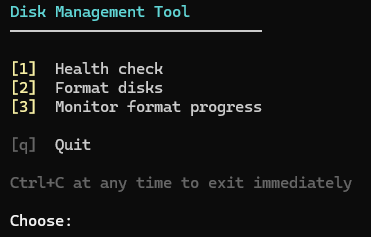
This is a technical write-up of a small disk management tool I built for managing a 12-slot SAS backplane. Health checks, parallel formatting, and a live progress monitor in one python script.
The Problem
On Linux, block device names are assigned in enumeration order. On a system with a SAS expander and hot-swappable drives, that means names change every time you pull or insert a disk. /dev/sdb today is not /dev/sdb after the next swap.
HDSentinel scans by device name. So it was quietly reporting health data for whatever happened to be at that path after the last hotplug or most of the time it wasn't seeing any disks. I had no idea until I cross-referenced serial numbers and noticed they did not match what I expected.
The fix is to stop using /dev/sdX as the identifier entirely.
Stable Device Identification
/dev/disk/by-path/ symlinks encode the physical path through the HBA and SAS expander:
pci-0000:02:00.0-sas-exp0x<WWN>-phy3-lun-0This path contains the PCI address of the HBA, the WWN of the expander, and the PHY number which maps to a physical bay. It does not change when disks are swapped.
The script defines a static mapping at the top:
PORTS = [ "/dev/disk/by-path/pci-<PCI_ADDR>-sas-exp0x<EXPANDER_WWN>-phy3-lun-0", "/dev/disk/by-path/pci-<PCI_ADDR>-sas-exp0x<EXPANDER_WWN>-phy4-lun-0", ...]SLOTS = [0, 1, 2, ...] # physical bay labels, index-matched to PORTSAt runtime, each symlink is resolved to its current /dev/sdX. Empty bays are skipped. The physical slot number is always the source of truth.
To find your own paths, insert one disk at a time and watch:
watch -n1 'ls /dev/disk/by-path/ | grep exp'Health Scanning
Health checks run through HDSentinel with explicit targets passed via -onlydevs:
HDSentinel -onlydevs /dev/disk/by-path/pci-...-phy3-lun-0,...Passing targets explicitly means HDSentinel only scans the intended disks. No accidental scanning of system disks, no missed bays, no wrong serial numbers.
Formatting Workflow
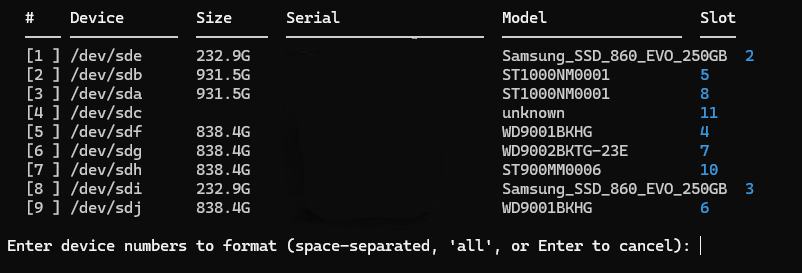
Low-level formatting runs through sg_format. Before starting, the tool sets queue depth to 1 and a short timeout per device:
def prep_for_format(dev_path: str) -> None: name = Path(dev_path).name sysfs = f"/sys/block/{name}/device" try: Path(f"{sysfs}/queue_depth").write_text("1") Path(f"{sysfs}/timeout").write_text("5") except OSError: passsg_format also expects the scsi generic device, not the block device. /dev/sdb and /dev/sg1 are not interchangeable here. The tool resolves the correct sg path from sysfs before launching:
def sg_device(dev_path: str) -> str: name = Path(dev_path).name sg_dir = Path(f"/sys/block/{name}/device/scsi_generic") try: sg_name = next(sg_dir.iterdir()).name return f"/dev/{sg_name}" except (StopIteration, OSError): return dev_pathI figured this out after sg_format behaved inconsistently for a while. The error behavior when targeting the wrong device type is not obvious.
Multiple disks are formatted in parallel. All lifecycle events are written to /var/log/diskops.log:
FORMAT_STARTED slot=3 dev=/dev/sdb model=ST4000NM0023 serial=Z1X0ABCDFORMAT_COMPLETE slot=3 dev=/dev/sdb model=ST4000NM0023 serial=Z1X0ABCDFORMAT_FAILED slot=3 dev=/dev/sdb model=ST4000NM0023 serial=Z1X0ABCDProgress Monitor

sg_format prints progress to stdout. When multiple format jobs run in parallel, the output from all processes goes to the same terminal and gets interleaved:
Progress indication: 14.33% doneProgress indication: 15.01% doneProgress indication: 14.87% doneProgress indication: 15.44% doneFour disks, four processes, no indication of which line belongs to which device.
The monitor does not read sg_format output at all. It polls each device independently using sg_requests --progress:
def _poll(state: DevState) -> None: r = subprocess.run( ["sg_requests", "--progress", state.sg_path], capture_output=True, text=True, timeout=10 ) output = r.stdout + r.stderr if re.search(r"progress indication", output, re.I): m = re.search(r"(\d+(?:\.\d+)?)\s*%", output) if m: state.progress = float(m.group(1)) state.status = "formatting" elif state.ever_started: state.status = "done" # stopped reporting after starting = completeEach disk gets its own row with a progress bar, elapsed time, and ETA. No curses dependency works over any SSH session.
Controls: r to force refresh, p to pause, +/- to adjust poll interval, q to quit.
The monitor launches automatically after a format job or can attach to already-running jobs.
Usage
Interactive menu:
sudo ./disk.pyOr directly:
sudo ./disk.py healthsudo ./disk.py health --dumpsudo ./disk.py formatsudo ./disk.py format --fastsudo ./disk.py progresssudo ./disk.py progress /dev/sda /dev/sdbThis is extremely specific to my environment and there is a very real chance nobody else on earth needs it. But it works for me, so it is going on GitHub anyway. If you also spend your evenings arguing with SAS backplanes, feel free to take a look.