
The previous lab ended with working IPsec tunnel between two SRX chassis clusters. With firewall HA covered on both sides the setup was solid, but obvious weak point was still the single link on each side. If that went down both nodes would be alive, healthy, fully synced, and completely useless.
So I added a second ISP link to each cluster and built four tunnels across them. With two ISPs and two clusters I had all possible path combinations covered.
THE DESIGN
Each cluster has two uplinks: reth0 on the first ISP and reth2 on the second. Four tunnels gives you four paths:
- TUN01: reth0-A (203.0.113.1) to reth0-B (203.0.113.2), ISP1 to ISP1
- TUN02: reth2-A (198.51.100.1) to reth2-B (198.51.100.2), ISP2 to ISP2
- TUN03: reth0-A (203.0.113.1) to reth2-B (198.51.100.2), ISP1 cross to ISP2
- TUN04: reth2-A (198.51.100.1) to reth0-B (203.0.113.2), ISP2 cross to ISP1
TUN03 and TUN04 are the cross paths. On any single link failure you lose two tunnels but the other two stay up. With equal-cost static routes across all four st0 subinterfaces traffic automatically falls back to whichever paths survive.
INTERFACES
The second ISP link means a third reth, so reth-count goes to 3:
set chassis cluster reth-count 3Both nodes need a physical member interface assigned to reth0 and reth2:
set interfaces ge-0/0/0 gigether-options redundant-parent reth0set interfaces ge-0/0/3 gigether-options redundant-parent reth2set interfaces ge-7/0/0 gigether-options redundant-parent reth0set interfaces ge-7/0/3 gigether-options redundant-parent reth2The reth units get their IPs same as before, and this time there are four st0 subinterfaces to create, one for each tunnel:
set interfaces reth0 unit 0 family inet address 203.0.113.1/30set interfaces reth2 unit 0 family inet address 198.51.100.1/30set interfaces st0 unit 0 family inet address 10.255.1.1/30set interfaces st0 unit 1 family inet address 10.255.2.1/30set interfaces st0 unit 2 family inet address 10.255.3.1/30set interfaces st0 unit 3 family inet address 10.255.4.1/30The st0 addresses are useful for scoped testing later, you can ping 10.255.2.2 to verify TUN02 specifically without involving any LAN hosts.
FOUR IKE GATEWAYS
Each tunnel gets its own gateway object. This is also where you start to understand why network engineers drink. Junos does not have a way to template this an I just typed all of it four times like it's 1999 and ctrl+c hasn't been invented yet.
TUN01 and TUN02 are straightforward since each one goes out from single interface toward single peer. Here is TUN01:
set security ike gateway GW-SRX-B ike-policy IKE-POL-SITE-Bset security ike gateway GW-SRX-B address 203.0.113.2set security ike gateway GW-SRX-B dead-peer-detection interval 10set security ike gateway GW-SRX-B dead-peer-detection threshold 3set security ike gateway GW-SRX-B local-identity inet 203.0.113.1set security ike gateway GW-SRX-B remote-identity inet 203.0.113.2set security ike gateway GW-SRX-B external-interface reth0.0set security ike gateway GW-SRX-B version v2-onlyTUN02 follows same pattern on reth2 pointing at 198.51.100.2. The cross paths are where it gets interesting. TUN03 goes out reth0 (203.0.113.1) toward the remote reth2 (198.51.100.2), meaning the peer address is on completely different subnet than the local interface:
set security ike gateway GW-SRX-B-TUN03 ike-policy IKE-POL-SITE-Bset security ike gateway GW-SRX-B-TUN03 address 198.51.100.2set security ike gateway GW-SRX-B-TUN03 dead-peer-detection interval 10set security ike gateway GW-SRX-B-TUN03 dead-peer-detection threshold 3set security ike gateway GW-SRX-B-TUN03 local-identity inet 203.0.113.1set security ike gateway GW-SRX-B-TUN03 remote-identity inet 198.51.100.2set security ike gateway GW-SRX-B-TUN03 external-interface reth0.0set security ike gateway GW-SRX-B-TUN03 version v2-onlyThe explicit local-identity and remote-identity are required on the cross tunnels. Without them Junos has no way to distinguish TUN03 from TUN02 since both point at 198.51.100.2 as the peer. Identity values make each gateway unique even when peer addresses or external interfaces overlap. TUN04 mirrors this logic in other direction from reth2.
DPD at 10 second intervals with threshold of 3 gives you a 30 second detection window before a dead tunnel gets pulled from forwarding table.
FOUR VPN OBJECTS
The VPN objects follow the same pattern for all four tunnels, each one binding to a gateway and an st0 subinterface:
set security ipsec vpn VPN-TO-SRX-B bind-interface st0.0set security ipsec vpn VPN-TO-SRX-B ike gateway GW-SRX-Bset security ipsec vpn VPN-TO-SRX-B ike ipsec-policy IPSEC-POL-MAINset security ipsec vpn VPN-TO-SRX-B establish-tunnels immediatelyRepeat for TUN02 through TUN04 with the matching gateway and st0 subinterface. establish-tunnels immediately on all four means IKE negotiation starts at the commit time rather than waiting for traffic to trigger it.
ZONES AND ROUTING
Both WAN interfaces go into UNTRUST, all four st0 subinterfaces go into VPN:
set security zones security-zone UNTRUST host-inbound-traffic system-services ikeset security zones security-zone UNTRUST interfaces reth0.0set security zones security-zone UNTRUST interfaces reth2.0set security zones security-zone VPN interfaces st0.0set security zones security-zone VPN interfaces st0.1set security zones security-zone VPN interfaces st0.2set security zones security-zone VPN interfaces st0.3The static routes to the remote LAN use qualified-next-hop so each tunnel gets a different preference. TUN01 is primary, the others are fallback in order:
set routing-options static route 192.168.2.0/24 qualified-next-hop st0.0 preference 10set routing-options static route 192.168.2.0/24 qualified-next-hop st0.1 preference 20set routing-options static route 192.168.2.0/24 qualified-next-hop st0.2 preference 30set routing-options static route 192.168.2.0/24 qualified-next-hop st0.3 preference 40This is different from the equal-cost next-hop approach. Instead of load balancing across all four tunnels Junos will always prefer TUN01 and only fall back to the next one when the st0 interface goes down. Lower preference wins, so TUN01 at 10 is always active as long as it is up.
One extra thing needed for testing: by default the SRX won't respond to pings on st0 interfaces because host-inbound-traffic on the VPN zone doesn't allow it. Adding ping fixes that:
set security zones security-zone VPN host-inbound-traffic system-services pingWithout this the st0 transit pings in the verification step will fail even when tunnel is fully up, which is confusing the first time you see it.
VERIFICATION
Check all four Phase 1 SAs
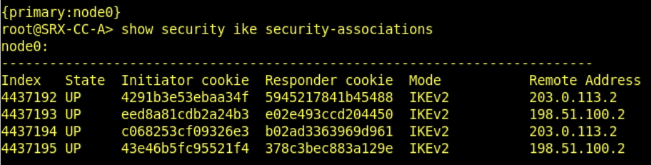
Then ping each st0 transit address to confirm Phase 2 on each tunnel before involving LAN hosts:
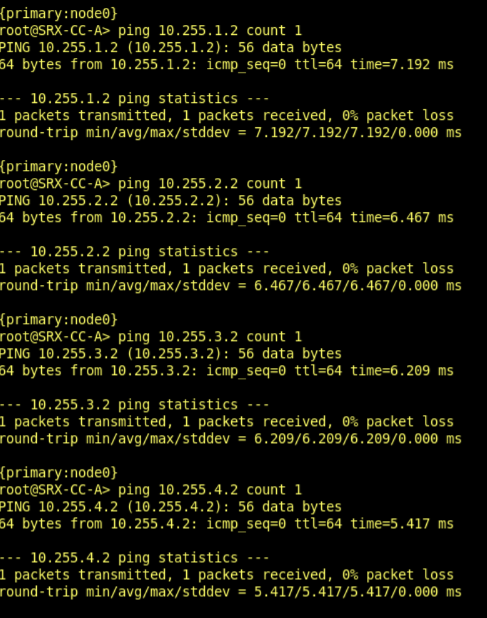
Once all four respond, test end-to-end through the tunnel from the LAN side. To verify failover actually works, bring down one of the ISP-facing reth interfaces and confirm traffic keeps flowing across the surviving paths.
THAT'S IT!
The config ends up with four gateways, four VPN objects, four st0 subinterfaces and four qualified-next-hop routes. Its repetitive in a way that makes you question your life choices around the third gateway, but there is no shortcut for it on SRX. Each tunnel is fully independent object with its own IKE and IPsec state. Junos does not have a "just make four of these" command. I checked.
Getting the config right was not actually hard. Getting it right four times in a row without making a single typo was a completely different problem. I did not achieve this. What I achieved was a working final config after several rounds of "why is this tunnel not coming up" followed by "oh I typed reth0 instead of reth2 again." Junos accepts the config either way and just lets you suffer.