
I have a habit of skipping the topics that look complicated and telling myself I will come back to them later. QoS was one of those topics. IPsec was another one. Honestly the list is longer than I want to admit. At some point you run out of "later" and have to just open the config and try.
I never actually configured QoS on Junos before this. I knew enough to survive multiple choice question, which mostly means I could recognize the word "DSCP" and feel okay about it. So I built small lab and decided to finally see what happens when you actually type the commands.
Before The Filter
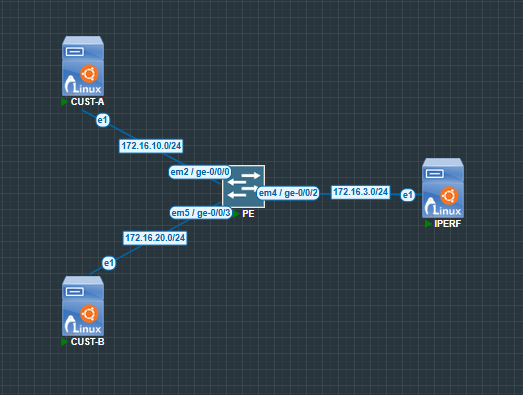
The lab runs on PNETLab with one vMX, two Linux hosts as customer traffic sources, and a third Linux host running iperf3 as the sink. Everything is directly connected.
Before touching any QoS config I benchmarked raw throughput. vMX in PNETLab is software-forwarded and it will quietly embarrass you if you just assume wire rate.

Around 97 Mbps unconstrained. I set policer CIR to 20 Mbps so the effect would be impossible to miss.
What You Need To Know Before The Config
Junos policers live under the firewall hierarchy. You define the policer, reference it from a firewall filter term, and apply that filter to an interface. The filter is what connects the rate limit to actual traffic. Policing is basically just dropping packets that go over your rate. Unlike shaping which buffers and delays, policing just discards.
In a data center with multiple tenants this is exactly what you use to enforce customer SLAs. One customer on a 20 Mbps tier should not be able to consume 90 Mbps just because the physical link allows it. The policer on the ingress interface is what enforces that contract. Simple mechanism, very practical use case.
Building The Policer
set firewall policer CUST-A-POLICER if-exceeding bandwidth-limit 20mset firewall policer CUST-A-POLICER if-exceeding burst-size-limit 300000set firewall policer CUST-A-POLICER then discardset firewall policer CUST-B-POLICER if-exceeding bandwidth-limit 20mset firewall policer CUST-B-POLICER if-exceeding burst-size-limit 300000set firewall policer CUST-B-POLICER then loss-priority highCust-A uses discard which drops exceeding packets immediately. Cust-B uses loss-priority high which marks them as expendable instead of dropping them on the spot, so they are first to go when there is actual congestion downstream. I set Cust-B this way intentionally because it will interact with the queuing config in later sessions.
Then firewall filters to wire the policers to actual traffic.
set firewall filter CUST-A-INGRESS term POLICE-ALL then policer CUST-A-POLICERset firewall filter CUST-A-INGRESS term POLICE-ALL then acceptset firewall filter CUST-B-INGRESS term POLICE-ALL then policer CUST-B-POLICERset firewall filter CUST-B-INGRESS term POLICE-ALL then acceptset interfaces ge-0/0/0 unit 0 family inet filter input CUST-A-INGRESSset interfaces ge-0/0/3 unit 0 family inet filter input CUST-B-INGRESSFilters go inbound on customer interfaces. Customers are the problem here, not us.
Watching It Work
Same iperf3 test with policer now applied:

97 Mbps dropped to about 15 Mbps. CIR is 20 Mbps but TCP landed a bit under because every time it tries to ramp up it hits the burst limit, backs off, and never really settles at the ceiling. It is like trying to run in airport, you get going and then something stops you and you have to start again.
Conclusion
I think the reason QoS scared me for so long is that every time I opened the chapter it started with DSCP values and CoS queues and RFC numbers and I closed it immediately. It felt like you had to understand everything before you could do anything. Apparently you do not have to memorize all 64 DSCP values before you are allowed to configure anything.