
I was presented with a case at work the other day. Different VLANs should exit through different uplinks on a QFX. VLAN 10 goes out Router-A with automatic failover if the primary goes down other vlans are forwarded with the default route. I found it interesting so I spun up PNETLab and built it. This is the walkthrough.
WHERE MY HEAD WENT FIRST (SPOILER: WRONG)
My first instinct was BGP knobs. Local-preference, MED, AS-path prepending. That's what BGP is for, right? Except BGP best-path operates per-prefix and picks one winner for all traffic. You can bias the entire routing table toward Router-A, but you can't say "local-pref 200 for VLAN 10 only." BGP policy runs against routes, not packets. It has no concept of source IP at forwarding time. So that idea quietly died.
Next thought was a firewall filter with a direct next-hop action - match source prefix, override the next-hop, and the packet goes where you want. Except if Router-A goes dark, the filter still sends VLAN 10 traffic toward its gateway and packets disappear into the void. You'd need a script to rewrite the filter on link-down, and I have enough things to maintain already, thank you.
As I was spitting off my dumb ideas I got suggested using routing-instances. My immediate thought was VRFs, since that's the normal tool for per-interface forwarding table separation. But VRFs are heavier than needed. Moving a VLAN between uplinks means detaching the IRB from one VRF and reattaching it to another, which disrupts traffic during the change. The right approach is virtual-router instances with filter-based forwarding. I hadn't done FBF before, so naturally I said yes and figured it out as I went.
STEP 1: THE UPSTREAM ROUTERS
The upstream routers need to advertise a default route into BGP toward the QFX. Each one has a static default pointing toward the host router and uses the network statement to redistribute it into BGP:
interface Loopback0 ip address 1.1.1.1 255.255.255.255!interface GigabitEthernet0/0 ip address 10.0.0.1 255.255.255.252 no shutdown!ip route 0.0.0.0 0.0.0.0 Loopback0!router bgp 65001 bgp router-id 1.1.1.1 neighbor 10.0.0.2 remote-as 65000 ! address-family ipv4 neighbor 10.0.0.2 activate network 0.0.0.0 mask 0.0.0.0 exit-address-familyIOS2 is identical with 2.2.2.2 and 10.0.1.x addressing. Verify both sessions come up on the QFX before touching anything else:
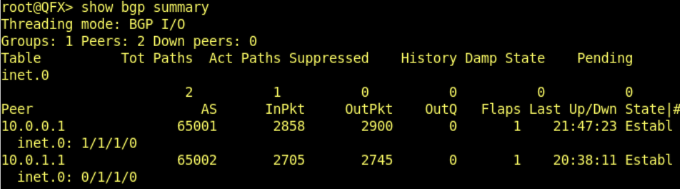
Once both sessions show Established you have two default routes sitting in inet.0, with best-path picking one winner for everything. At this point all VLANs exit through the same uplink, which is exactly what we're about to change.
STEP 2: THE ROUTING INSTANCES
The idea is one virtual-router instance pointing at IOS2. VLAN 10 gets steered into it and exits through IOS2. Everything else hits the DEFAULT term and follows inet.0 best-path out Router-A as normal. The qualified-next-hop handles failover. If IOS2 goes down, the standby preference kicks in and VLAN 10 falls back to IOS1 without any manual intervention:
set routing-instances IOS2 instance-type virtual-routerset routing-instances IOS2 routing-options static route 0.0.0.0/0 qualified-next-hop 10.0.1.1 preference 5set routing-instances IOS2 routing-options static route 0.0.0.0/0 qualified-next-hop 10.0.0.1 preference 10The instance needs to resolve those next-hops, which means it needs to see the uplink connected routes. By default those only exist in inet.0. A rib-group copies them in:
set routing-options interface-routes rib-group inet UPLINKset routing-options rib-groups UPLINK import-rib IOS2.inet.0After commit, check that the connected routes made it into the instances. If the next-hops aren't resolving, this is the first place to look:
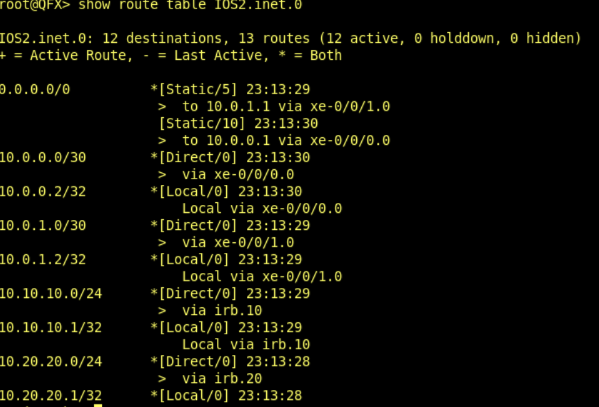
Both uplink subnets showing up inside the instance means the next-hops will resolve and the static defaults will go active. If you see unresolved next-hops, the rib-group is the first thing to check.
STEP 3: THE FILTER
A single filter goes on every IRB at ingress. Source prefix gets matched against a prefix-list and the packet gets steered into the correct instance. Scaling is handled by the prefix-lists rather than filter terms, so adding a VLAN later means touching exactly one line:
set policy-options prefix-list VLANS-IOS2 10.10.10.0/24set firewall family inet filter FBF term IOS2 from source-prefix-list VLANS-IOS2set firewall family inet filter FBF term IOS2 then routing-instance IOS2set firewall family inet filter FBF term DEFAULT then acceptset interfaces irb unit 10 family inet filter input FBFSTEP 4: VERIFY
Traceroute from the hosts.


For failover, disable the uplink and check the instance RIB:
set interfaces xe-0/0/1 disablecommit
Preference jumped from 5 to 10, next-hop shifted to IOS1. Re-enable the interface and the preference-5 entry comes back on its own. No intervention needed, which is the whole point.
CONCLUSION
FBF with virtual-router instances is genuinely clean for this case once it's in place. The rib-group and filter look like a lot of moving parts upfront, but after initial setup the only thing that changes when you add a VLAN is the prefix-list.
If you're coming from a VRF background like I was and never touched other routing instances, the mental shift is that you're not putting interfaces INTO the instances. The instances are just routing tables with a static default. The filter is what decides which table a packet uses. Once that clicks, the whole thing makes sense.